Showing posts with label Managed Android Debug Bridge. Show all posts

Saturday, April 2, 2016

Droid Explorer working on Non-Rooted Device

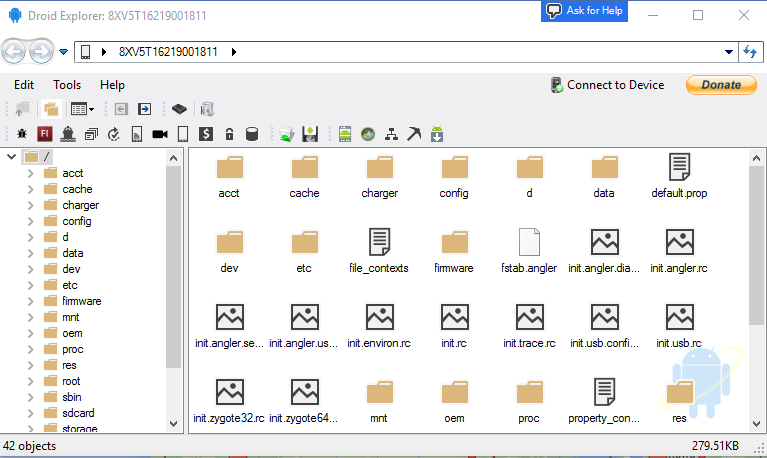
I have started doing some work on removing the dependency on rooted device, specifically, busybox. This is no where near complete, and is buggy, at best. As you can see from the screenshot, you can see most of the folders, but if you try to go in to some of them, you will not see any files. This is my Nexus 6P, which is not rooted, connected to Droid Explorer. I do not have busybox or anything else special installed.

no-root

It doesn’t look like much, but this is a big change to the code base. I have been removing code from the Core.CommandRunner, the code that handles 99% of the communication between your computer and your device. Instead it is making use of madb, which minimizes the need for adb, and only uses it to act as the adb server. While the old code used adb as the server, but also depended on the adb client to do the communication to the device. Madb is the client, and it does all the communication to the adb server.


No binaries available yet, as I stated, this is very early. The code will be available on the Droid Explorer Github soon.

Friday, April 22, 2011

Droid Explorer 0.8.8.0 Released

explorer-viewLast night I released a new version of Droid Explorer that addresses some major issues that were introduced with the latest versions of the SDK.

  • Fixed the issue with the latest android SDK using “platform-tools” directory instead of “platforms/android-{platformversions}/tools”.
  • Fixed the screen shot tool to support newer devices (some are now using 32bpp RGB, instead of 16bpp RGB565)
  • Fixed an issue with the Bart plugin license not being detected on the device.
  • Fixed the console not working on some devices.
  • Added Device icons for the LG G2X and Samsung Galaxy S variants.
  • The Google USB drivers have been removed from the installer
  • Use existing SDK is now the default and recommended option
  • Other minor fixes

Download Droid Explorer 0.8.8.0

As always, there are x86 and 64 bit versions available.

The Standalone version is an “Offline Installer” where the other can download additional files (if you are not using an existing SDK).

The last release of Droid Explorer (0.8.7.2) has ~139,000 downloads since August 21 2010, exactly eight months ago. The plan is for more releases of Droid Explorer, in much shorter time frames again. So lets see if the 0.8.8.0 can exceed the number of downloads before the next release (I doubt it will happen Smile)

Thursday, July 22, 2010

Droid Explorer in the top 20

Droid Explorer has had over 3000 downloads in the last 7 days. This is enough to put it in the top 20 most downloaded this week on CodePlex out of the 16,518 projects hosted there. Finally getting more downloads then projects like Facebook Developer Toolkit, IronPython and BlogEngine.Net.

 de-top-20

Managed Android Debug Bridge has a new logo, and is now known as Mad Bee. Someone mentioned it to me, I liked the idea and went with it.

madb-logo-codeplex

Friday, June 25, 2010

Device Information Extras

madb-xunitMy goal for Managed Android Debug Bridge is not just to port the functionality from DDMS/ADB, but to make it useful to developers.

The original Device in ddms has a dictionary for mount points, but it only has the 3 hard coded m ount points. So if a rooted device, with busybox is connected, then it will pull all the mount points on the system.


This gives some information like this:

rootfs			/			rootfs	ro
tmpfs /dev tmpfs rw
devpts /dev/pts devpts rw
proc /proc proc rw
sysfs /sys sysfs rw
tmpfs /sqlite_stmt_journals tmpfs rw
none /dev/cpuctl cgroup rw
/dev/block/mtdblock3 /system yaffs2 ro
/dev/block/mtdblock5 /data yaffs2 rw
/dev/block/mtdblock4 /cache yaffs2 rw
/dev/block/mmcblk0p2 /sd-ext ext2 rw
/dev/block/vold/179:1 /sdcard vfat rw

Notice how the /system mount is read-only. That is because I also have a method to set the mount point ReadWrite/ReadOnly. Again, this will really only be useful for rooted devices, but it also gives the ability to check what the current “access” of the mount is as well. So Droid Explorer can check if the mount is read-only before doing a file operation, like a delete or create, and it can change the mount to read-write if needed (and if it is "enabled" by the user).


MADB also can transfer files better then regular adb. The ddms library does not handle symlinks, but MADB does. So if you try to copy a symlink, it will resolve it and copy over the original, but still name it what the symlink is.


Pulling multiple files from the device can also easily allow developers to show the total progress for the transfer. For the unit tests, I created a simple ISyncProgressMonitor that writes how many bytes were transferred, out of the total bytes, plus how many bytes are remaining. Here is a sample output, with some data trimmed for space, of a pull of /system/app


Starting Transfer
Syncing /system/app/BugReport.apk
Transfered 23669 of 13334850 - 13311181 remaining
Syncing /system/app/EnhancedGoogleSearchProvider.apk
Transfered 89205 of 13334850 - 13245645 remaining
Transfered 154741 of 13334850 - 13180109 remaining
Transfered 220277 of 13334850 - 13114573 remaining
Transfered 274775 of 13334850 - 13060075 remaining
...
Syncing /system/app/Street.apk
Transfered 10224322 of 13334850 - 3110528 remaining
Transfered 10264332 of 13334850 - 3070518 remaining
Syncing /system/app/Talk.apk
Transfered 10329868 of 13334850 - 3004982 remaining
Transfered 10395404 of 13334850 - 2939446 remaining
Transfered 10460940 of 13334850 - 2873910 remaining
Transfered 10526476 of 13334850 - 2808374 remaining
Transfered 10592012 of 13334850 - 2742838 remaining
Transfered 10657548 of 13334850 - 2677302 remaining
Transfered 10717042 of 13334850 - 2617808 remaining
...
Syncing /system/app/YouTube.apk
Transfered 12817565 of 13334850 - 517285 remaining
Transfered 12883101 of 13334850 - 451749 remaining
Transfered 12948637 of 13334850 - 386213 remaining
Transfered 13014173 of 13334850 - 320677 remaining
Transfered 13079709 of 13334850 - 255141 remaining
Transfered 13145245 of 13334850 - 189605 remaining
Transfered 13210781 of 13334850 - 124069 remaining
Transfered 13276317 of 13334850 - 58533 remaining
Transfered 13334850 of 13334850 - 0 remaining

Thursday, June 24, 2010

Working with the SyncService

I have gotten a few more key parts of the Managed Android Debug Bridge done. The SyncService has some important methods completed. I have been able to successfully pull a single file from a device, and push a single file to a device. Still not working is the ability to push and pull multiple files, but that is next.

Even though this is a port of the DDMS library, I have taken it upon myself to make some needed changes to some components. For example, when pulling a file, here is the original ddmslib code:

public SyncResult pullFile(String remoteFilepath, String localFilename, ISyncProgressMonitor monitor) {
monitor.start(0);
//TODO: use the {@link FileListingService} to get the file size.

SyncResult result = doPullFile(remoteFilepath, localFilename, monitor);
monitor.stop();
return result;
}


Notice the “TODO”, this means that when this method is used to pull a file, there is no “notifications” to the ISyncProgressMonitor since the total bytes is set to 0 in the monitor.start. I took the 5 minutes to actually write the method in the FileListingService that can take a string path, and find the FileEntry object, or it will throw a FileNotFoundException. Once we have the FileEntry, we can determine how much data is going to be transfered. Here is the same method, but in MADB.


public SyncResult PullFile ( String remoteFilepath, String localFilename, ISyncProgressMonitor monitor ) {
if ( monitor == null ) {
throw new ArgumentNullException ( "monitor", "Monitor cannot be null" );
}

long totalWork = 0;
try {
FileListingService fls = new FileListingService ( this.Device );
FileEntry remoteFileEntry = fls.FindEntry ( remoteFilepath );
totalWork = remoteFileEntry.Size;
} catch ( FileNotFoundException ffe ) {
Console.WriteLine ( ffe.ToString ( ) );
Log.w ( "ddms", ffe );
}
monitor.Start ( totalWork );

SyncResult result = DoPullFile ( remoteFilepath, localFilename, monitor );

monitor.Stop ( );
return result;
}


If it fails to find the FileEntry, then it continues on just like the original does. Here is the FindFileEntry method in the FileListingService.


public FileEntry FindFileEntry ( String path ) {
String[] entriesString = path.Split ( new char[] { LinuxPath.DirectorySeparatorChar }, StringSplitOptions.RemoveEmptyEntries );
FileEntry current = this.Root;
foreach ( var pathItem in entriesString ) {
FileEntry[] entries = GetChildren ( current, true, null );
foreach ( var e in entries ) {
if ( String.Compare ( e.Name, pathItem, false ) == 0 ) {
current = e;
continue;
}
}
}
if ( String.Compare ( current.FullPath, path, false ) == 0 ) {
Console.WriteLine ( "returning: {0}", current.FullPath );
return current;
} else {
throw new FileNotFoundException ( String.Format ( "Unable to locate {0}", path ) );
}
}


Another thing that I thought should be modified was the Regex used for the FileListingService. In the original version, it only supports the stock Android ls command. I have modified it to support the stock ls, plus it supports busybox ls as well. This was a selfish act, since it helps me closer to my goal of not requiring busybox in order for Droid Explorer to work.
Wednesday, June 23, 2010

MADB FileListingService

mad-hatter-hatThe Managed Android Debug Bridge is coming along. I did some work on the FileListingService, but messed up the checkin and its now missing some files in the project. This will be fixed tomorrow. The FileListingService is the component that is responsible for ADB request that require file information. At the core, it executes an “ls –l” on the device and parses the return data for the information.

I have made some modifications to the Regex used to parse the return data so that both stock “ls” and “busybox ls” are supported. This means that Droid Explorer will be able to perform some operations on non-rooted devices once MADB is integrated in. The good news is, Droid Explorer + MADB will also be able to detect if busybox is installed on the device. It will also be able to display more detailed information, even more then ADB, when pushing or pulling a file to / from the device.

MADB gives more information to developers when executing remote commands when the file does not exist, or even if an “ls” is attempted on a directory does not exist. It does so by throwing a FileNotFoundException. Otherwise, the specified IShellOutputReceiver will be the way developers will know what is happening in the remote command.

Monday, June 21, 2010

Managed Android Debug Bridge

I have been slowly working on a side project of Droid Explorer called Managed Android Debug Bridge (MADB) and I finally have checked in some code that actually compiles.

MADB is a port of the ddms java library that the ddms uses. This allows communication with the ADB server via TCP and gives more flexibility to developers then calling the adb binary directly. For starters, MADB can request the FrameBuffer, which is what is used to get a screenshot of the device. This is different then pulling /dev/graphics/fb0 because:

  1. that requires root and MADB doesn’t
  2. fb0 contains 2+ frames of data and MADB only gets 1
  3. MADB is faster since its less data to transfer
  4. MADB returns the device screen resolution, ARGB length & offset & bpp. fb0 has none of that information

I have a very small portion of it implemented. Currently, I have the GetFrameBuffer, ExecuteRemoteCommand, Reboot & GetDevices implemented. I’ve actually gone a little further with ExecuteRemoteCommand then the original library, as it checks for the error message that would be displayed if the binary was not found and the method throws a FileNotFoundException instead of just handing the data off to the IShellOutputReceiver.

The goal of MADB is to mimic the functionality that is available via the ddms library and make it available to .NET projects. This project will also be used in Droid Explorer once it has the needed functionality that Droid Explorer requires.

Saturday, June 19, 2010

New version of Droid Explorer – 0.8.6.0

screenshot

A new build of Droid Explorer is available for download

There are a lot of fixes / changes to this build, here is a list of them

  • fixed missing file in the standalone installer
  • added check for minimum .net framework version in to bootstrapper (v3.5sp1)
  • increased the service start/stop timeout in the bootstrapper from 30 seconds to 60 seconds
  • removed initial strings from download panel labels of bootstrapper
  • htc desire / bravo icon added for attached devices - thanks to beadza for identifying the device
  • added ability to only install the SDK Tools by running install with /sdk switch
  • sdk install mode checks if DE is installed, if not, it switches to full install mode
  • bart plugin now also checks the sd-ext mount point for the license.
  • added the sd-ext app paths as valid application paths
  • added sd-ext app paths to the application backup plugin
  • removed anda.pk plugin as the site is dead.
  • screencast plugin changed to pull the jnlp file directly from the trunk of the project. If there is an error, it falls back to a "local" file
  • fixed issues with spaces in folder names
  • motorola backflip icon added for attached devices - thanks to zibiza for identifying the device
  • new screenshot app that handles all resolutions. Uses new methods to get the framebuffer data
  • adjusted the RGB565 class to better handle other devices for screenshots
  • started to implement communicating with adb over TCP like ddms does. – This will wind up being part of the Managed Android Debug Bridge.
  • acer liquid icon added for attached devices - thanks to fyodor0218 for identifying the device
  • started working on the ability to use existing sdk (not yet an option, but soon)

One of the biggest changes is the communicating with adb over TCP. I started to port the code that the ddmslib uses to directly communicate with adb. This is done over a TCP socket. The current reason for this was specifically for the screenshot plugin. Previous versions only took screenshots of devices that had a screen resolution of 320x480. It, like all the other screenshot applications for android pulled the data from the framebuffer located at /dev/graphics/fb0. The problem with pulling this file with adb pull /dev/graphics/fb0 ./fb0 is the framebuffer contains 2+ frames of data because android implements double buffering. So to display 1 image, applications pull down data for 2+ images. This takes some time to perform, not to mention the time it takes to then render the image from the data. Also a problem is you have to know the screen resolution of the device your reading the buffer for, otherwise you will end up with a garbled image.

Using the TCP method eliminates these problems. First, it only sends one frame of data, so we are not pulling extra, unused bytes, so it speeds up the transfer time. It also sends back the screen resolution of the image, plus other information like the bpp, argb lengths and offsets.

My plan is to move everything that Droid Explorer uses the adb.exe commands for over to TCP eventually. The SDK is still required to be on the machine, but it gives more control to Droid Explorer, and in this case, speeds things up.

Showing posts with label Managed Android Debug Bridge. Show all posts

Droid Explorer working on Non-Rooted Device

I have started doing some work on removing the dependency on rooted device, specifically, busybox. This is no where near complete, and is buggy, at best. As you can see from the screenshot, you can see most of the folders, but if you try to go in to some of them, you will not see any files. This is my Nexus 6P, which is not rooted, connected to Droid Explorer. I do not have busybox or anything else special installed.

no-root

It doesn’t look like much, but this is a big change to the code base. I have been removing code from the Core.CommandRunner, the code that handles 99% of the communication between your computer and your device. Instead it is making use of madb, which minimizes the need for adb, and only uses it to act as the adb server. While the old code used adb as the server, but also depended on the adb client to do the communication to the device. Madb is the client, and it does all the communication to the adb server.


No binaries available yet, as I stated, this is very early. The code will be available on the Droid Explorer Github soon.

Droid Explorer 0.8.8.0 Released

explorer-viewLast night I released a new version of Droid Explorer that addresses some major issues that were introduced with the latest versions of the SDK.

  • Fixed the issue with the latest android SDK using “platform-tools” directory instead of “platforms/android-{platformversions}/tools”.
  • Fixed the screen shot tool to support newer devices (some are now using 32bpp RGB, instead of 16bpp RGB565)
  • Fixed an issue with the Bart plugin license not being detected on the device.
  • Fixed the console not working on some devices.
  • Added Device icons for the LG G2X and Samsung Galaxy S variants.
  • The Google USB drivers have been removed from the installer
  • Use existing SDK is now the default and recommended option
  • Other minor fixes

Download Droid Explorer 0.8.8.0

As always, there are x86 and 64 bit versions available.

The Standalone version is an “Offline Installer” where the other can download additional files (if you are not using an existing SDK).

The last release of Droid Explorer (0.8.7.2) has ~139,000 downloads since August 21 2010, exactly eight months ago. The plan is for more releases of Droid Explorer, in much shorter time frames again. So lets see if the 0.8.8.0 can exceed the number of downloads before the next release (I doubt it will happen Smile)

Droid Explorer in the top 20

Droid Explorer has had over 3000 downloads in the last 7 days. This is enough to put it in the top 20 most downloaded this week on CodePlex out of the 16,518 projects hosted there. Finally getting more downloads then projects like Facebook Developer Toolkit, IronPython and BlogEngine.Net.

 de-top-20

Managed Android Debug Bridge has a new logo, and is now known as Mad Bee. Someone mentioned it to me, I liked the idea and went with it.

madb-logo-codeplex

Device Information Extras

madb-xunitMy goal for Managed Android Debug Bridge is not just to port the functionality from DDMS/ADB, but to make it useful to developers.

The original Device in ddms has a dictionary for mount points, but it only has the 3 hard coded m ount points. So if a rooted device, with busybox is connected, then it will pull all the mount points on the system.


This gives some information like this:

rootfs			/			rootfs	ro
tmpfs /dev tmpfs rw
devpts /dev/pts devpts rw
proc /proc proc rw
sysfs /sys sysfs rw
tmpfs /sqlite_stmt_journals tmpfs rw
none /dev/cpuctl cgroup rw
/dev/block/mtdblock3 /system yaffs2 ro
/dev/block/mtdblock5 /data yaffs2 rw
/dev/block/mtdblock4 /cache yaffs2 rw
/dev/block/mmcblk0p2 /sd-ext ext2 rw
/dev/block/vold/179:1 /sdcard vfat rw

Notice how the /system mount is read-only. That is because I also have a method to set the mount point ReadWrite/ReadOnly. Again, this will really only be useful for rooted devices, but it also gives the ability to check what the current “access” of the mount is as well. So Droid Explorer can check if the mount is read-only before doing a file operation, like a delete or create, and it can change the mount to read-write if needed (and if it is "enabled" by the user).


MADB also can transfer files better then regular adb. The ddms library does not handle symlinks, but MADB does. So if you try to copy a symlink, it will resolve it and copy over the original, but still name it what the symlink is.


Pulling multiple files from the device can also easily allow developers to show the total progress for the transfer. For the unit tests, I created a simple ISyncProgressMonitor that writes how many bytes were transferred, out of the total bytes, plus how many bytes are remaining. Here is a sample output, with some data trimmed for space, of a pull of /system/app


Starting Transfer
Syncing /system/app/BugReport.apk
Transfered 23669 of 13334850 - 13311181 remaining
Syncing /system/app/EnhancedGoogleSearchProvider.apk
Transfered 89205 of 13334850 - 13245645 remaining
Transfered 154741 of 13334850 - 13180109 remaining
Transfered 220277 of 13334850 - 13114573 remaining
Transfered 274775 of 13334850 - 13060075 remaining
...
Syncing /system/app/Street.apk
Transfered 10224322 of 13334850 - 3110528 remaining
Transfered 10264332 of 13334850 - 3070518 remaining
Syncing /system/app/Talk.apk
Transfered 10329868 of 13334850 - 3004982 remaining
Transfered 10395404 of 13334850 - 2939446 remaining
Transfered 10460940 of 13334850 - 2873910 remaining
Transfered 10526476 of 13334850 - 2808374 remaining
Transfered 10592012 of 13334850 - 2742838 remaining
Transfered 10657548 of 13334850 - 2677302 remaining
Transfered 10717042 of 13334850 - 2617808 remaining
...
Syncing /system/app/YouTube.apk
Transfered 12817565 of 13334850 - 517285 remaining
Transfered 12883101 of 13334850 - 451749 remaining
Transfered 12948637 of 13334850 - 386213 remaining
Transfered 13014173 of 13334850 - 320677 remaining
Transfered 13079709 of 13334850 - 255141 remaining
Transfered 13145245 of 13334850 - 189605 remaining
Transfered 13210781 of 13334850 - 124069 remaining
Transfered 13276317 of 13334850 - 58533 remaining
Transfered 13334850 of 13334850 - 0 remaining

Working with the SyncService

I have gotten a few more key parts of the Managed Android Debug Bridge done. The SyncService has some important methods completed. I have been able to successfully pull a single file from a device, and push a single file to a device. Still not working is the ability to push and pull multiple files, but that is next.

Even though this is a port of the DDMS library, I have taken it upon myself to make some needed changes to some components. For example, when pulling a file, here is the original ddmslib code:

public SyncResult pullFile(String remoteFilepath, String localFilename, ISyncProgressMonitor monitor) {
monitor.start(0);
//TODO: use the {@link FileListingService} to get the file size.

SyncResult result = doPullFile(remoteFilepath, localFilename, monitor);
monitor.stop();
return result;
}


Notice the “TODO”, this means that when this method is used to pull a file, there is no “notifications” to the ISyncProgressMonitor since the total bytes is set to 0 in the monitor.start. I took the 5 minutes to actually write the method in the FileListingService that can take a string path, and find the FileEntry object, or it will throw a FileNotFoundException. Once we have the FileEntry, we can determine how much data is going to be transfered. Here is the same method, but in MADB.


public SyncResult PullFile ( String remoteFilepath, String localFilename, ISyncProgressMonitor monitor ) {
if ( monitor == null ) {
throw new ArgumentNullException ( "monitor", "Monitor cannot be null" );
}

long totalWork = 0;
try {
FileListingService fls = new FileListingService ( this.Device );
FileEntry remoteFileEntry = fls.FindEntry ( remoteFilepath );
totalWork = remoteFileEntry.Size;
} catch ( FileNotFoundException ffe ) {
Console.WriteLine ( ffe.ToString ( ) );
Log.w ( "ddms", ffe );
}
monitor.Start ( totalWork );

SyncResult result = DoPullFile ( remoteFilepath, localFilename, monitor );

monitor.Stop ( );
return result;
}


If it fails to find the FileEntry, then it continues on just like the original does. Here is the FindFileEntry method in the FileListingService.


public FileEntry FindFileEntry ( String path ) {
String[] entriesString = path.Split ( new char[] { LinuxPath.DirectorySeparatorChar }, StringSplitOptions.RemoveEmptyEntries );
FileEntry current = this.Root;
foreach ( var pathItem in entriesString ) {
FileEntry[] entries = GetChildren ( current, true, null );
foreach ( var e in entries ) {
if ( String.Compare ( e.Name, pathItem, false ) == 0 ) {
current = e;
continue;
}
}
}
if ( String.Compare ( current.FullPath, path, false ) == 0 ) {
Console.WriteLine ( "returning: {0}", current.FullPath );
return current;
} else {
throw new FileNotFoundException ( String.Format ( "Unable to locate {0}", path ) );
}
}


Another thing that I thought should be modified was the Regex used for the FileListingService. In the original version, it only supports the stock Android ls command. I have modified it to support the stock ls, plus it supports busybox ls as well. This was a selfish act, since it helps me closer to my goal of not requiring busybox in order for Droid Explorer to work.

MADB FileListingService

mad-hatter-hatThe Managed Android Debug Bridge is coming along. I did some work on the FileListingService, but messed up the checkin and its now missing some files in the project. This will be fixed tomorrow. The FileListingService is the component that is responsible for ADB request that require file information. At the core, it executes an “ls –l” on the device and parses the return data for the information.

I have made some modifications to the Regex used to parse the return data so that both stock “ls” and “busybox ls” are supported. This means that Droid Explorer will be able to perform some operations on non-rooted devices once MADB is integrated in. The good news is, Droid Explorer + MADB will also be able to detect if busybox is installed on the device. It will also be able to display more detailed information, even more then ADB, when pushing or pulling a file to / from the device.

MADB gives more information to developers when executing remote commands when the file does not exist, or even if an “ls” is attempted on a directory does not exist. It does so by throwing a FileNotFoundException. Otherwise, the specified IShellOutputReceiver will be the way developers will know what is happening in the remote command.

Managed Android Debug Bridge

I have been slowly working on a side project of Droid Explorer called Managed Android Debug Bridge (MADB) and I finally have checked in some code that actually compiles.

MADB is a port of the ddms java library that the ddms uses. This allows communication with the ADB server via TCP and gives more flexibility to developers then calling the adb binary directly. For starters, MADB can request the FrameBuffer, which is what is used to get a screenshot of the device. This is different then pulling /dev/graphics/fb0 because:

  1. that requires root and MADB doesn’t
  2. fb0 contains 2+ frames of data and MADB only gets 1
  3. MADB is faster since its less data to transfer
  4. MADB returns the device screen resolution, ARGB length & offset & bpp. fb0 has none of that information

I have a very small portion of it implemented. Currently, I have the GetFrameBuffer, ExecuteRemoteCommand, Reboot & GetDevices implemented. I’ve actually gone a little further with ExecuteRemoteCommand then the original library, as it checks for the error message that would be displayed if the binary was not found and the method throws a FileNotFoundException instead of just handing the data off to the IShellOutputReceiver.

The goal of MADB is to mimic the functionality that is available via the ddms library and make it available to .NET projects. This project will also be used in Droid Explorer once it has the needed functionality that Droid Explorer requires.

New version of Droid Explorer – 0.8.6.0

screenshot

A new build of Droid Explorer is available for download

There are a lot of fixes / changes to this build, here is a list of them

  • fixed missing file in the standalone installer
  • added check for minimum .net framework version in to bootstrapper (v3.5sp1)
  • increased the service start/stop timeout in the bootstrapper from 30 seconds to 60 seconds
  • removed initial strings from download panel labels of bootstrapper
  • htc desire / bravo icon added for attached devices - thanks to beadza for identifying the device
  • added ability to only install the SDK Tools by running install with /sdk switch
  • sdk install mode checks if DE is installed, if not, it switches to full install mode
  • bart plugin now also checks the sd-ext mount point for the license.
  • added the sd-ext app paths as valid application paths
  • added sd-ext app paths to the application backup plugin
  • removed anda.pk plugin as the site is dead.
  • screencast plugin changed to pull the jnlp file directly from the trunk of the project. If there is an error, it falls back to a "local" file
  • fixed issues with spaces in folder names
  • motorola backflip icon added for attached devices - thanks to zibiza for identifying the device
  • new screenshot app that handles all resolutions. Uses new methods to get the framebuffer data
  • adjusted the RGB565 class to better handle other devices for screenshots
  • started to implement communicating with adb over TCP like ddms does. – This will wind up being part of the Managed Android Debug Bridge.
  • acer liquid icon added for attached devices - thanks to fyodor0218 for identifying the device
  • started working on the ability to use existing sdk (not yet an option, but soon)

One of the biggest changes is the communicating with adb over TCP. I started to port the code that the ddmslib uses to directly communicate with adb. This is done over a TCP socket. The current reason for this was specifically for the screenshot plugin. Previous versions only took screenshots of devices that had a screen resolution of 320x480. It, like all the other screenshot applications for android pulled the data from the framebuffer located at /dev/graphics/fb0. The problem with pulling this file with adb pull /dev/graphics/fb0 ./fb0 is the framebuffer contains 2+ frames of data because android implements double buffering. So to display 1 image, applications pull down data for 2+ images. This takes some time to perform, not to mention the time it takes to then render the image from the data. Also a problem is you have to know the screen resolution of the device your reading the buffer for, otherwise you will end up with a garbled image.

Using the TCP method eliminates these problems. First, it only sends one frame of data, so we are not pulling extra, unused bytes, so it speeds up the transfer time. It also sends back the screen resolution of the image, plus other information like the bpp, argb lengths and offsets.

My plan is to move everything that Droid Explorer uses the adb.exe commands for over to TCP eventually. The SDK is still required to be on the machine, but it gives more control to Droid Explorer, and in this case, speeds things up.