Showing posts with label aspnetmvc. Show all posts

Friday, May 24, 2013

Introducing EndpointMvc

EndpointMvc is a library that dynamically created documentation for your api endpoints. All you have to do is register EndpointMvc’s routes, and add an attribute to your classes to indicate that it is an endpoint.

All the information comes from the method signature itself, or attributes that are added to the methods, classes, parameters, and properties. Most of the attributes are built-in attributes, only a few other attributes are used to add additional information that attributes do not currently exist for.

EndpointMvc supports three output formats, Html, Json, and Xml. The Html format requires the view to be part of your projects views, but the sample mvc project has a starting point for the Html format.

EndpointMvc is also available via Nuget:

Install-Package EndpointMvc
Saturday, December 31, 2011

Html5 Unobtrusive Form Validation for ASP.NET MVC

I have a project that I was able to make use of modern browsers HTML5 form validation. But I wanted to include the validation that also takes place from within aspnet mvc so there is a unified experience with the validating the form. I took the jquery.unobtrusive-validation.js and made some modifications to it to hook in to the aspnet mvc validation. It is not yet 100%, the “Required” aspnet mvc validation doesn’t seem to “trigger” unless the field is filled out, then attempted to be submitted, and then cleared again, but the default html5 “required” validation message still shows initially. Either way, I figured I would share this and maybe someone could build on it and improve it. Enjoy.

Here are some screenshots of the results.

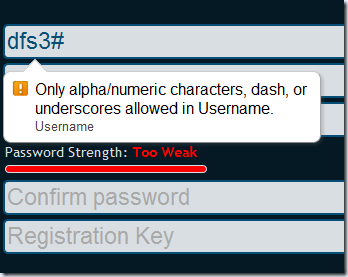
Failed Regex Validation
image 

Failed Minimum String Length Validation
image 

Failed Remote Password Strength Validation
image

Failed Compare to Password Field Validation
image


Download from Skydrive

Showing posts with label aspnetmvc. Show all posts

Introducing EndpointMvc

EndpointMvc is a library that dynamically created documentation for your api endpoints. All you have to do is register EndpointMvc’s routes, and add an attribute to your classes to indicate that it is an endpoint.

All the information comes from the method signature itself, or attributes that are added to the methods, classes, parameters, and properties. Most of the attributes are built-in attributes, only a few other attributes are used to add additional information that attributes do not currently exist for.

EndpointMvc supports three output formats, Html, Json, and Xml. The Html format requires the view to be part of your projects views, but the sample mvc project has a starting point for the Html format.

EndpointMvc is also available via Nuget:

Install-Package EndpointMvc

Html5 Unobtrusive Form Validation for ASP.NET MVC

I have a project that I was able to make use of modern browsers HTML5 form validation. But I wanted to include the validation that also takes place from within aspnet mvc so there is a unified experience with the validating the form. I took the jquery.unobtrusive-validation.js and made some modifications to it to hook in to the aspnet mvc validation. It is not yet 100%, the “Required” aspnet mvc validation doesn’t seem to “trigger” unless the field is filled out, then attempted to be submitted, and then cleared again, but the default html5 “required” validation message still shows initially. Either way, I figured I would share this and maybe someone could build on it and improve it. Enjoy.

Here are some screenshots of the results.

Failed Regex Validation
image 

Failed Minimum String Length Validation
image 

Failed Remote Password Strength Validation
image

Failed Compare to Password Field Validation
image


Download from Skydrive