Showing posts with label adb. Show all posts

Saturday, April 2, 2016

Droid Explorer working on Non-Rooted Device

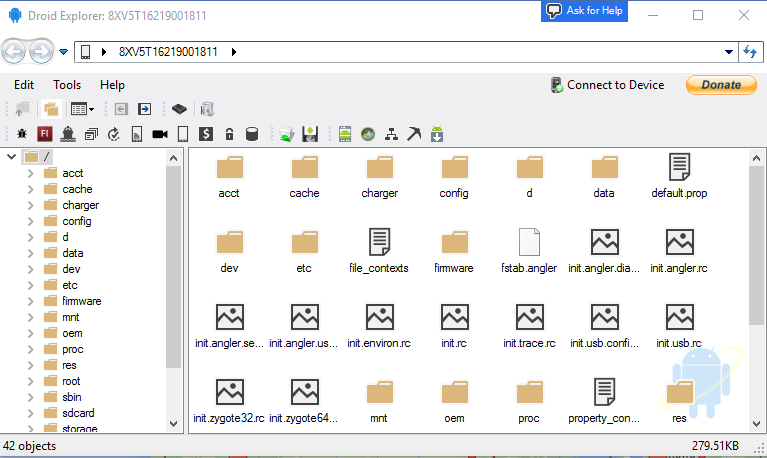
I have started doing some work on removing the dependency on rooted device, specifically, busybox. This is no where near complete, and is buggy, at best. As you can see from the screenshot, you can see most of the folders, but if you try to go in to some of them, you will not see any files. This is my Nexus 6P, which is not rooted, connected to Droid Explorer. I do not have busybox or anything else special installed.

no-root

It doesn’t look like much, but this is a big change to the code base. I have been removing code from the Core.CommandRunner, the code that handles 99% of the communication between your computer and your device. Instead it is making use of madb, which minimizes the need for adb, and only uses it to act as the adb server. While the old code used adb as the server, but also depended on the adb client to do the communication to the device. Madb is the client, and it does all the communication to the adb server.


No binaries available yet, as I stated, this is very early. The code will be available on the Droid Explorer Github soon.

Wednesday, August 29, 2012

Droid Explorer 0.8.8.7 Backup Feature

Droid Explorer 0.8.8.7 will be released in just a few days and will have some new features that you may find useful if you have a 4.x device.

The biggest feature is the ability to backup your device (does not require root). If you do not have a 4.x device connected, you will not be able to take advantage of this method of backup.

image

Along with that feature comes some additional features on top of it. A central location for your Android Backup files (*.ab). They will be stored in a folder in your user profile called “Android Backups”. This folder has a special folder applied to it so it is easy to tell where your backups are located.

image

Inside this folder there will be a folder for each device you use with Droid Explorer to create backups. The folder name is the “ID” of the device or the “Name” of the device if you changed it in the settings. Here you will see I have a couple backups in the folder Killik (the name I gave one of my devices).

image

But what can you do with these backups? Well, you can restore your device with them, of course. Just double click on one of the Android Backup (.ab) files and select the device you want to restore to. Make sure you restore to the correct device. I am not responsible for any disasters restoring may cause, including, but not limited to bricking your device, cat jumping of a cliff, house burning down. I may look in to extending the backups a bit, so Droid Explorer knows what device they came from, but that is not in this version.

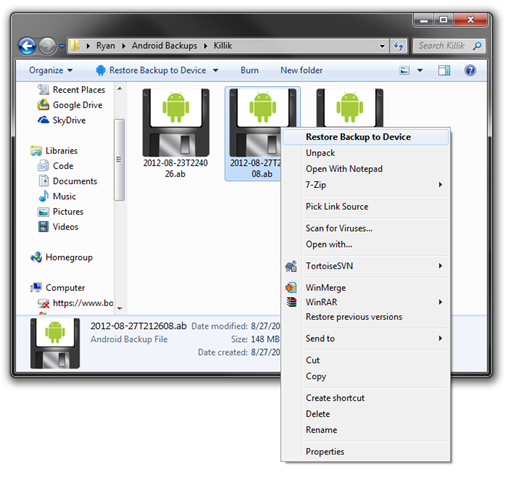
If you right click on the Android Backup, you will also be given the option to restore the backup to a device. But, look closer at the picture below… There is also an option to unpack the backup file. This will turn the Android Backup in to a TAR Archive. Then you can get to the inner contents of the backup, like the Application Files if you choose to include those in your Backup.
image 

Another feature that will be added in the future is the ability to view backups from within Droid Explorer. If you have Droid Explorer v0.8.8.6, you will get a notification when you open Droid Explorer after the new version has been released. Keep your eye out for this version and future versions.

As always, if you have ideas for Droid Explorer, submit a Feature Request.
Monday, November 14, 2011

Connecting to Nook Color w/ CyanogenMod7 via ADB over USB

nook-colorThe Nook Color is a great device, especially when CyanogenMod is installed on the device. The only issue I was having with the device, I was unable to connect to the device via ADB over USB.

I followed the steps here, but was still unable to see the device via ADB. After looking through the “fix” that was linked from XDA, I noticed that it modifies, or creates a file in %USERPROFILE%\.android\ called adb_usb.ini. That file contains vendor id’s for the devices and it contains 0x2080. As I was digging around looking to fix this issue, I noticed that in the root of my Android SDK installation there is a folder called .android. In that folder, just like the one in my user profile, there is a file called adb_usb.ini. This file is empty, except a couple comments describing the file. I added the 0x2080 to this file, then I restarted adb by doing an adb kill-server, then an adb start-server.

Now when I do adb devices, I can see the Nook Color and I can perform any adb or shell commands on the device via adb over USB.

Wednesday, May 25, 2011

Droid Explorer 1.0 on Non-Rooted Devices

I hit somewhat of a milestone today. I got the Droid Explorer 1.0 branch to build. Not only that, about 90% of the communication from Droid Explorer and the device is now done through MadBee. That’s the Managed Android Debug Bridge, if you were not aware. MadBee is basically an enhanced port of the Android Debug Bridge library that ships as part of the Android SDK. There are other features that I have added to it, like the ability to check if the device has BusyBox, or if the device can execute SU commands.

MadBee is available from NuGet, but is still very young. I occasionally notice some issues with how things work while using it as the “power” behind Droid Explorer, and go in and make some modifications. But I always update on NuGet, but that means I may update there often.

What, exactly does MadBee mean for Droid Explorer? Well, I am glad I asked. MadBee is the link between the device and Droid Explorer. Since it is based off the original Android Debug Bridge, it was initially meant for non-rooted devices. It has always been my intentions, and goal, to have Droid Explorer working on ALL devices, not just rooted ones. MadBee helps make that happen. Now, MadBee does not circumvent any security that is already in place on your device, so if you don’t have a rooted device, you will not be able to perform any tasks that would require root, like remount /system with read-write.

There is still a lot of work to be done before this build of Droid Explorer will be ready for the public, but here is a teaser of Droid Explorer connected to a non-rooted Galaxy Tab.

de-on-unrooted-gtab

Friday, April 22, 2011

Droid Explorer 0.8.8.0 Released

explorer-viewLast night I released a new version of Droid Explorer that addresses some major issues that were introduced with the latest versions of the SDK.

  • Fixed the issue with the latest android SDK using “platform-tools” directory instead of “platforms/android-{platformversions}/tools”.
  • Fixed the screen shot tool to support newer devices (some are now using 32bpp RGB, instead of 16bpp RGB565)
  • Fixed an issue with the Bart plugin license not being detected on the device.
  • Fixed the console not working on some devices.
  • Added Device icons for the LG G2X and Samsung Galaxy S variants.
  • The Google USB drivers have been removed from the installer
  • Use existing SDK is now the default and recommended option
  • Other minor fixes

Download Droid Explorer 0.8.8.0

As always, there are x86 and 64 bit versions available.

The Standalone version is an “Offline Installer” where the other can download additional files (if you are not using an existing SDK).

The last release of Droid Explorer (0.8.7.2) has ~139,000 downloads since August 21 2010, exactly eight months ago. The plan is for more releases of Droid Explorer, in much shorter time frames again. So lets see if the 0.8.8.0 can exceed the number of downloads before the next release (I doubt it will happen Smile)

Wednesday, August 18, 2010

Droid Explorer in the top 10!

logo-home

Droid Explorer is, as of the time I am writing this, the #9 most downloaded project on CodePlex. I think this is awesome and want to thank everyone that is using Droid Explorer.

I have been hard at work fixing the issue with the Droid Explorer Service. This is the service that identifies when a device is connected to the PC and shows the device in Explorer. I will have the fix in place by the end of the week and published.

I have also been working the Droid Explorer branch that will become the 0.9.x release. This will be the first version that will support non-rooted devices. The only requirement is that the device can be seen via ADB. All functionality may not be initially available to non-rooted devices, especially in the first versions of the 0.9.x releases. I will be refactoring more and more of the code to stop using custom communication via adb.exe and use the same communication methods that the DDMS uses. This will be accomplished by using MAD Bee.

I am also shooting for an update mechanism being built in to Droid Explorer in the 0.9.x releases. It is going to be a framework that will use an Atom feed to get available updates. It will allow multiple update locations, to allow plugins to specify their own update feed source. Updates can define requirements, minimum/maximum version, and how to “install” the updates. But that is a bit off from being incorporated, it may not make it in until a few releases in to the 0.9.x releases.

Tuesday, July 6, 2010

Boot Animation Preview 1.4

bapBoot Animation Preview is a tool that allows you to preview a boot animation on your PC without having to install it on the device and reboot just to see it. It also has the ability to create an animation GIF image from the animation to be used on a website or forum for showing the visitors a preview of the animation. If ADB is in the system path, then it can also apply the image to the attached device.

I’ve uploaded a new version of the Boot Animation Preview this morning. It fixes an issue of not loading boot animations that use Jpeg’s. This is the only change in the release.

The application requires Microsoft .NET Framework 3.5 SP1 be installed on the machine. It also requires ADB be in the Path environment variable if you want to set the boot animation to a connected Android device.

Download

Showing posts with label adb. Show all posts

Droid Explorer working on Non-Rooted Device

I have started doing some work on removing the dependency on rooted device, specifically, busybox. This is no where near complete, and is buggy, at best. As you can see from the screenshot, you can see most of the folders, but if you try to go in to some of them, you will not see any files. This is my Nexus 6P, which is not rooted, connected to Droid Explorer. I do not have busybox or anything else special installed.

no-root

It doesn’t look like much, but this is a big change to the code base. I have been removing code from the Core.CommandRunner, the code that handles 99% of the communication between your computer and your device. Instead it is making use of madb, which minimizes the need for adb, and only uses it to act as the adb server. While the old code used adb as the server, but also depended on the adb client to do the communication to the device. Madb is the client, and it does all the communication to the adb server.


No binaries available yet, as I stated, this is very early. The code will be available on the Droid Explorer Github soon.

Droid Explorer 0.8.8.7 Backup Feature

Droid Explorer 0.8.8.7 will be released in just a few days and will have some new features that you may find useful if you have a 4.x device.

The biggest feature is the ability to backup your device (does not require root). If you do not have a 4.x device connected, you will not be able to take advantage of this method of backup.

image

Along with that feature comes some additional features on top of it. A central location for your Android Backup files (*.ab). They will be stored in a folder in your user profile called “Android Backups”. This folder has a special folder applied to it so it is easy to tell where your backups are located.

image

Inside this folder there will be a folder for each device you use with Droid Explorer to create backups. The folder name is the “ID” of the device or the “Name” of the device if you changed it in the settings. Here you will see I have a couple backups in the folder Killik (the name I gave one of my devices).

image

But what can you do with these backups? Well, you can restore your device with them, of course. Just double click on one of the Android Backup (.ab) files and select the device you want to restore to. Make sure you restore to the correct device. I am not responsible for any disasters restoring may cause, including, but not limited to bricking your device, cat jumping of a cliff, house burning down. I may look in to extending the backups a bit, so Droid Explorer knows what device they came from, but that is not in this version.

If you right click on the Android Backup, you will also be given the option to restore the backup to a device. But, look closer at the picture below… There is also an option to unpack the backup file. This will turn the Android Backup in to a TAR Archive. Then you can get to the inner contents of the backup, like the Application Files if you choose to include those in your Backup.

image 

Another feature that will be added in the future is the ability to view backups from within Droid Explorer. If you have Droid Explorer v0.8.8.6, you will get a notification when you open Droid Explorer after the new version has been released. Keep your eye out for this version and future versions.

As always, if you have ideas for Droid Explorer, submit a Feature Request.

Connecting to Nook Color w/ CyanogenMod7 via ADB over USB

nook-colorThe Nook Color is a great device, especially when CyanogenMod is installed on the device. The only issue I was having with the device, I was unable to connect to the device via ADB over USB.

I followed the steps here, but was still unable to see the device via ADB. After looking through the “fix” that was linked from XDA, I noticed that it modifies, or creates a file in %USERPROFILE%\.android\ called adb_usb.ini. That file contains vendor id’s for the devices and it contains 0x2080. As I was digging around looking to fix this issue, I noticed that in the root of my Android SDK installation there is a folder called .android. In that folder, just like the one in my user profile, there is a file called adb_usb.ini. This file is empty, except a couple comments describing the file. I added the 0x2080 to this file, then I restarted adb by doing an adb kill-server, then an adb start-server.

Now when I do adb devices, I can see the Nook Color and I can perform any adb or shell commands on the device via adb over USB.

Droid Explorer 1.0 on Non-Rooted Devices

I hit somewhat of a milestone today. I got the Droid Explorer 1.0 branch to build. Not only that, about 90% of the communication from Droid Explorer and the device is now done through MadBee. That’s the Managed Android Debug Bridge, if you were not aware. MadBee is basically an enhanced port of the Android Debug Bridge library that ships as part of the Android SDK. There are other features that I have added to it, like the ability to check if the device has BusyBox, or if the device can execute SU commands.

MadBee is available from NuGet, but is still very young. I occasionally notice some issues with how things work while using it as the “power” behind Droid Explorer, and go in and make some modifications. But I always update on NuGet, but that means I may update there often.

What, exactly does MadBee mean for Droid Explorer? Well, I am glad I asked. MadBee is the link between the device and Droid Explorer. Since it is based off the original Android Debug Bridge, it was initially meant for non-rooted devices. It has always been my intentions, and goal, to have Droid Explorer working on ALL devices, not just rooted ones. MadBee helps make that happen. Now, MadBee does not circumvent any security that is already in place on your device, so if you don’t have a rooted device, you will not be able to perform any tasks that would require root, like remount /system with read-write.

There is still a lot of work to be done before this build of Droid Explorer will be ready for the public, but here is a teaser of Droid Explorer connected to a non-rooted Galaxy Tab.

de-on-unrooted-gtab

Droid Explorer 0.8.8.0 Released

explorer-viewLast night I released a new version of Droid Explorer that addresses some major issues that were introduced with the latest versions of the SDK.

  • Fixed the issue with the latest android SDK using “platform-tools” directory instead of “platforms/android-{platformversions}/tools”.
  • Fixed the screen shot tool to support newer devices (some are now using 32bpp RGB, instead of 16bpp RGB565)
  • Fixed an issue with the Bart plugin license not being detected on the device.
  • Fixed the console not working on some devices.
  • Added Device icons for the LG G2X and Samsung Galaxy S variants.
  • The Google USB drivers have been removed from the installer
  • Use existing SDK is now the default and recommended option
  • Other minor fixes

Download Droid Explorer 0.8.8.0

As always, there are x86 and 64 bit versions available.

The Standalone version is an “Offline Installer” where the other can download additional files (if you are not using an existing SDK).

The last release of Droid Explorer (0.8.7.2) has ~139,000 downloads since August 21 2010, exactly eight months ago. The plan is for more releases of Droid Explorer, in much shorter time frames again. So lets see if the 0.8.8.0 can exceed the number of downloads before the next release (I doubt it will happen Smile)

Droid Explorer in the top 10!

logo-home

Droid Explorer is, as of the time I am writing this, the #9 most downloaded project on CodePlex. I think this is awesome and want to thank everyone that is using Droid Explorer.

I have been hard at work fixing the issue with the Droid Explorer Service. This is the service that identifies when a device is connected to the PC and shows the device in Explorer. I will have the fix in place by the end of the week and published.

I have also been working the Droid Explorer branch that will become the 0.9.x release. This will be the first version that will support non-rooted devices. The only requirement is that the device can be seen via ADB. All functionality may not be initially available to non-rooted devices, especially in the first versions of the 0.9.x releases. I will be refactoring more and more of the code to stop using custom communication via adb.exe and use the same communication methods that the DDMS uses. This will be accomplished by using MAD Bee.

I am also shooting for an update mechanism being built in to Droid Explorer in the 0.9.x releases. It is going to be a framework that will use an Atom feed to get available updates. It will allow multiple update locations, to allow plugins to specify their own update feed source. Updates can define requirements, minimum/maximum version, and how to “install” the updates. But that is a bit off from being incorporated, it may not make it in until a few releases in to the 0.9.x releases.

Boot Animation Preview 1.4

bapBoot Animation Preview is a tool that allows you to preview a boot animation on your PC without having to install it on the device and reboot just to see it. It also has the ability to create an animation GIF image from the animation to be used on a website or forum for showing the visitors a preview of the animation. If ADB is in the system path, then it can also apply the image to the attached device.

I’ve uploaded a new version of the Boot Animation Preview this morning. It fixes an issue of not loading boot animations that use Jpeg’s. This is the only change in the release.

The application requires Microsoft .NET Framework 3.5 SP1 be installed on the machine. It also requires ADB be in the Path environment variable if you want to set the boot animation to a connected Android device.

Download